Peter Birkholm-Buch

Stuff about Software Engineering

Page 7 of 17

Using GitHub as a Software Development Platform improves Developer Experience

Introduction

This is part 1 of:

Explaining how Carlsberg unifies development on GitHub and accelerates innovation with Copilot in more detail.

Navigating Complexity: The Challenge of Multiple Development Tools

In the fast-paced world of software development, managing multiple tools can become a bottleneck that impedes efficiency and innovation. At Carlsberg, our developers and engineers were navigating a complex toolchain landscape that included GitHub, GitLab, BitBucket, Azure DevOps, Jenkins, Nexus, SonarQube, and both Azure and AWS Container Registries. This multiplicity not only slowed down our processes but also fragmented our development environment, leading to increased context-switching and security vulnerabilities.

Unified Platform: Adopting GitHub for Streamlined Operations

The decision to streamline our development tools into a single, integrated platform came as a strategic move to enhance our operational efficiency and bolster security measures. We chose GitHub as our all-encompassing platform for several reasons:

  • GitHub Source Control provides a robust system for tracking changes in computer files and coordinating work on those files among multiple people.
  • GitHub Actions makes it easier to automate all your software workflows, now with world-class CI/CD. Build, test, and deploy your code right from GitHub.
  • GitHub Packages serves as a software package hosting service that allows you to host your software packages privately or publicly and use packages as dependencies in your projects.

By migrating from Jenkins to GitHub Actions, from SonarQube to GitHub’s integrated code scanning features, and from Nexus and various container registries to GitHub Packages, we were able to retire outdated systems and reduce our toolchain complexity significantly.

Enhanced Productivity and Security: The Benefits of Consolidation

The consolidation has profoundly impacted our software development operations by centralizing source control and unifying the development environment. Our engineers now enjoy a streamlined workflow with reduced context-switching, thanks to a centralized pipeline and improved build and deployment processes managed through GitHub Actions. The centralization of package management through GitHub Packages has also enhanced the efficiency of managing and sharing package dependencies.

By reducing our tools from nine to one, we’ve not only simplified our technology stack but also enhanced our capability to manage projects more effectively, ensuring that our software development practices continue to support Carlsberg’s legacy of innovation.

Future Focus: Continuing Innovation at Carlsberg

As we continue to refine our approach and leverage the full potential of GitHub, our focus remains on innovation and efficiency. The journey of consolidating our development tools has been a pivotal step in our digital transformation strategy, positioning Carlsberg at the forefront of technological advancement in the beverage industry.

Carlsberg unifies development on GitHub and accelerates innovation with Copilot

I’m honored that GitHub have chosen to do a customer story on how we’re transforming software development in Carlsberg: https://github.com/customer-stories/carlsberg-group and a friggin awesome movie.

The movie was also used by Satya Nadella in the Build 2024 Keynote:

To provide a bit more background information I’ve written some posts:

The Four Tenets of SOA

The SOA tenets originally appeared back in 2004 when  Don Box published an article on MSDN called “A Guide to developing and Running Connected Systems with Indigo” (Indigo is what’s known today as Windows Communication Foundation or WCF for short). Don Box wrote that WCF is based on SOA principles and that unlike other approaches, specifically object orientation, SOA requires a different set of assumptions:

In Indigo, a service is simply a program that one interacts with via message exchanges. A set of deployed services is a system. Individual services are built to last—the availability and stability of a given service is critical. The aggregate system of services is built to allow for change—the system must adapt to the presence of new services that appear a long time after the original services and clients have been deployed, and these must not break functionality.

Although Microsoft have pledged to keep the MSDN Magazine online at the time of writing the article linked above is not available.

Service-oriented development is based on the four fundamental tenets that follow:

  • Boundaries are explicit 
  • Services are autonomous
  • Services share schema and contract, not class
  • Service compatibility is determined based on policy 

Let’s go over what that means in terms of modern REST services.

Four Tenets

Boundaries are explicit

Services interact by sending messages across boundaries. These boundaries are formal and explicit. No assumptions are made about what is behind boundaries, and this preserves flexibility in how services are implemented and deployed.

This means that:

  • You must treat all services as external to you
  • Internal (private) implementation details should not be leaked outside of a service boundary
  • Avoid RPC interfaces because this can lead to an overuse of calls – accessing a service is not the same as accessing a local object

Services are autonomous

Services are not subservient to other code: a service reacts to a message – how that message was created and what will happen to any response the service creates is immaterial to the action that this service will take.

This means that:

  • Deploy and version services independently from the clients
  • Design contracts with the assumption that once published, they can’t be modified

Services share schema and contract, not class

Only messages pass from service to service, code does not.

This means that:

  • Contracts should be designed to be as explicit as possible to minimize misinterpretation
  • A service must be able to convert its native data types to and from some technology-neutral representation
  • The contract must be versioned using semantic versioning

Service compatibility is determined based on policy

A service must be able to express in a standard representation of policy what it does and how clients should communicate with it.

This means that:

  • The policy must be exposed using an Open API Specification

ChatGPT Vision could be used to destroy incumbent image recognition solutions in CPG

I finally got access to ChatGPT Vision and I uploaded a picture of some beers I had at home:

This is the response from ChatGPT:

Nice selection of beers you got there! I see Perlenbacher, which is often associated with Lidl supermarkets, and of course, the iconic Carlsberg. Carlsberg, founded in 1847, is one of the most well-known beer brands globally and is based out of Copenhagen, Denmark. “Birra Messina” seems to be a Sicilian beer. Each of these beers brings a different taste profile to the table. Enjoy responsibly! Would you like to know more about any specific beer?

I then prompted this using TypeChat:

Please attempt to recognize the cans in the picture and fill out the following response:
interface Response {
data: Array<{ name: string, brand: string, count: number}>;
}

And I got this from ChatGPT:

Sure, here’s the response based on the image:

interface Response {
data: Array<{ name: string, brand: string, count: number}>;
}

const beerData: Response = {
data: [
{ name: "Premium Pilsner", brand: "Perlenbacher", count: 2 },
{ name: "Pilsner", brand: "Carlsberg", count: 2 },
{ name: "Classic", brand: "Birra Messina", count: 1 }
]
};

This is based on the visible labels in the image.

No training – no nothing. I know the internet is full of examples of people having ChatGPT turning Figma drawings into web sites and apps – but this is totally out of the comfort zone of ChatGPT and I have previous experience trying to teach image recognition of packaged goods to models and it’s not that easy.

Solutions based on this could destroy the incumbent vendors in image recognition in the CPG market.

Clippy talking to Clippy talking to Clippy…

I listened to a podcast interview with Christian Lanng (Christian Lanng: “How Being a Founder Almost Killed Me”  | E1065) about his next thing with Beyondwork and them trying find out what that means.

Christian says that he doesn’t want a future where a Clippy has to talk to a Clippy which talks to another Clippy and so on. In this context Clippy is some sort of an “AI” which can provide some answer.

I don’t know if that is true or not or if it’s the future we want or not – but right now, that seems to be where we’re headed.

  • LangChain is about chaining prompts and answers together so that we can get better answers
  • Microsoft Copilot Plugins is about enabling Microsoft Copilot to extend your prompts to other systems and consolidate the answers and perform tasks on your behalf
  • Microsoft TypeChat is about providing types and structure to the data we want to pass between systems to make interoperability even easier and more precise

I’ve spent the first 20 years of my life as a developer and the last 20 or so as an “architect” in many different contexts and it almost always boils down to solving integration between business domains and figuring out how data can be accessed, translated and acted upon across the different domains either in real time or before some date and time.

I totally agree with the sentiment that most, if not all, business systems are really just a database with a UI on top and that actual business value comes from combining the data across all systems and extracting answers from it. However, as long as the “business” continues to lock data in silos and refuses to adapt business processes to standard systems and demands customization of systems to accommodate the last 20% of functionality in a way that almost makes integration impossible – then I think the Clippies are going to be around for some time to come.

I think short to medium term the scenarios with plugins to Microsoft Copilot (and similar) will prove valuable to most businesses. Longer term we still need to fix copyright (AIs will be stopped from scraping), privacy (business are scared of leaks) and authentication/authorization (who are you and what do you have access to across boundaries). For instance how can we safely solve problems where data is scattered across private and public domain.

It’s going to be interesting and some new rules/processes are going to have to be worked out.

Opsætning af Newland 2D Skanner

Nedenfor installationsvejledning til Newland 2D Stregkode Skanner Model FR27 solgt af EG (tidligere ClinicCare).

Start med at sætte skanneren i din computer i en ledig USB-A port.

Hent konfigurationsprogram fra https://www.newland-id.com/en/services/software-drivers/easyset-software. Denne guide passer til EasySet v.1.2.28 (men passer sikkert også til senere versioner).

Konfigurationsprogrammet skal pakkes ud to gange før man kan bruge det.

Højreklik på filen og vælg pak alle ud.

Når filen er pakket ud, skal vi pakke den ud een gang til.

Nu har vi så endelig adgang til selve konfigurationsprogrammet. Dobbeltklik så programmet starter.

Hvis du har Windows Defender (eller et andet virusprogram installeret) vil du (måske) få denne advarsel. Det er fordi at programmet ikke er kendt af Windows. Eneste mulighed for at komme videre er at klikke på “more info”.

Nu kan man vælge at starte programmet alligevel.

Klik på next, next, next osv.

Nu har du et program ikon på din desktop som du kan dobbeltklikke på for at starte konfigurationsprogrammet.

Vælg “Online Device”

Vælg “Configure Device”

Vælg “HID Keyboard” og sæt “Bar Code Type” til “2D” og klik på “Save to Device”.

Nu er du klar til at teste. Åbn Notepad og læs dit sundhedskort (enten plastik eller telefon) ind ved at holde det foran skanneren.

Når CPR. nummer er læst bliver det sat ind der for cursoren er placeret. Jeg har med vilje erstattet de sidste 5 tegn med en stjerne nedenfor.

Jeg synes det er vigtigt at bemærke at skanneren kun indlæser CPR. nummer og intet andet. Hvis man f.eks. bruger ClinicCare til Web vil man altså ingen fordele have af skanneren, da man ligeså godt kan bede klienten om at oplyse det.

Hvis du har fulgt denne vejledning og det virker så har du lige sparet 1000kr+moms som EG ellers tager for at give vejledning i opsætning af deres “2D skanner”.

Jeg finder det noget useriøst at EG anvender produkter fra leverandører hvor tilhørende programmel ikke kan genkendes af gængs antivirus programmel og at man i det hele taget er nødt til at installere yderligere programmel for at få en skanner til at virke. Det er jo en pengemaskine for EG.

Jeff Meyerson: “Move Fast – How Facebook Builds Software

This book is more a string of mini interview resumes of former Facebook employees than an actual reference book with actionable information.

If you’re looking for detailed insight into how Facebook actually organizes teams and does software development then this is not a book for you.

On the other hand, if you’re looking for an easy read with a few high level but somewhat value pointers then this is for you.

1 of out 5 stars

Useful resources on Software & Systems Architecture

I think these books are valuable references when building software systems:

I think these websites are valuable references when identifying patterns:

Azure API Management Gateway

These are my thoughts and key take aways from Azure API Management Gateway (APIM) from working with it for some years now.

Easy to Expose Services

Whether it’s a new service built on Azure Functions or a Logic App, something existing internally or externally – it’s dead easy to expose services and secure them through APIM. In fact it’s so easy people don’t believe me when I tell them it takes minutes rather than weeks.

The builtin Dashboard and Analytics gives you a complete overview of requests, response times, errors and so on. With Application Insights you get x-ray vision into the complete end to end call stack for all requests.

Branding the (old) Developer Portal

Branding the – now almost defunct old – Developer Portal using the underlying Orchard CMS is simple and quite a lot can be achieved in a day or two. Going fancy is also a possibility if you know someone who can do a bit of HTML magic with JavaScript and CSS.

The only real problem is the underlying structuring of APIs into Products (think of a Product as a subscription for your mobile phone with different plans for talk time, data and so on) that can be a bit of a challenge when trying to present and manage APIs and Products in whatever way a customer thinks is most important for them. I hope the new portal (and an update to the Products feature in APIM with support for nesting) will make this easier.

Takes only a few days to get to above look and feel by someone who is familiar with a CMS and some HTML, CSS and JS.

Updating an API (needs better builtin support…)

Updating APIs with new methods or revisions of existing should be simple as APIM supports OpenAPI V2+3 Specifications (OAS) – so just point APIM to the OAS file and APIM will detect changes and import. However APIM is does not support this. So most of the time you’re down to a complete re-import so then just updating the change by hand is easier.

Yes APIs can be programmatically updated through the APIM Managment API but it’s not straight forward especially in multiple APIM instance scenarios and you’re then forced to write and maintain scripting to handle this.

Microsoft recently released the APIM DevOps Toolkit which aims at making it easier to move APIs between different instances of APIM. This is done using some tools which can alleviate some of the pain but it’s based on quite a bit of low level handling of configuration files in both JSON and YAML, OpenAPI, ARM Templates and some .NET Core utilities – it works but it feels like it’s introducing complexity where it should be solving the underlying problem of seamless support for updating the API methods based on an Open API specification (leave the policies to a second layer of configuration and/or store it in the SCM).

Azure DevOps with API Management Extension

I like the API Management Suite extension to Azure DevOps as it integrates directly in the release pipeline and deploys an API based on an OAS file in v2/v3 and JSON/YAML formats.

The extension also includes several predefined tasks to create/update products and versioned APIs.

I like using a repo to decouple the API team from the development team. So that the API specification can be agreed upon before the actual development takes place. The developers then implements the API according to the specification and maintains any changes to the OAS file.

API Driven Development

There are numerous definitions for API Driven Development (ADD) floating around so I’m just going to share my implementation of it.

Step 1:

  • The API specification is implemented by an “API Architect” in collaboration with the business. This ensures that externally exposed APIs are as homogenous as possible by sharing resource names, paths and data models
  • The specification is pushed to a repo in Azure DevOps

Step 2:

  • The developers implements the API according to the specification
  • The specification is updated with any additional information
  • Automated integration tests are added
  • A PR is created with changes and tests

Step 3:

  • The specification is validated against a common ruleset using Spectral
  • The API specification is deployed to APIM
  • Automatic integration tests are run
API Driven Development with Azure API Management

An API is a Product!

This is perhaps more important that whatever platform and process you use to expose the actual API to your customers.

You have to treat an API as a product – same as any other product you sell. You have to have a team to support it, take care of it, listen to customer feedback and to keep an eye on the SLA.

You can’t expose internal QA versions with limited SLA as the “test” version – everything you expose is IN PRODUCTION – period.

This is in my experience something that requires a bit of getting used to for companies just getting into the API game!

Azure Cosmos DB

These are my thoughts and key take aways from working with Azure Cosmos DB for a while now.

Infinite Ease

Creating a database importing some data and querying it through the Data Explorer takes literally 5 minutes.

Creating an interface using Azure Logic Apps with the Cosmos connector or a proper API using Azure Functions with bindings and PowerShell is an additional 5 minutes.

Expose the API through the Azure API Management Gateway and you have a complete schema-less database and data access layer in 15 minutes.

Cosmos is hands down the most easy and accessible database technology I’ve ever worked with – period!

Infinite Scale

Cosmos is built to be infinitely scalable in terms of storage and performance.

Data is stored in storage partitions in chunks of 10GB and Cosmos automatically adds more storage partitions as needed. It works great and is seamless – only gotcha is that Cosmos for some reason won‘t scale storage partitions back to less than two which in most cases probably doesn’t matter much, but it is an issue with regards to cost. See more below.

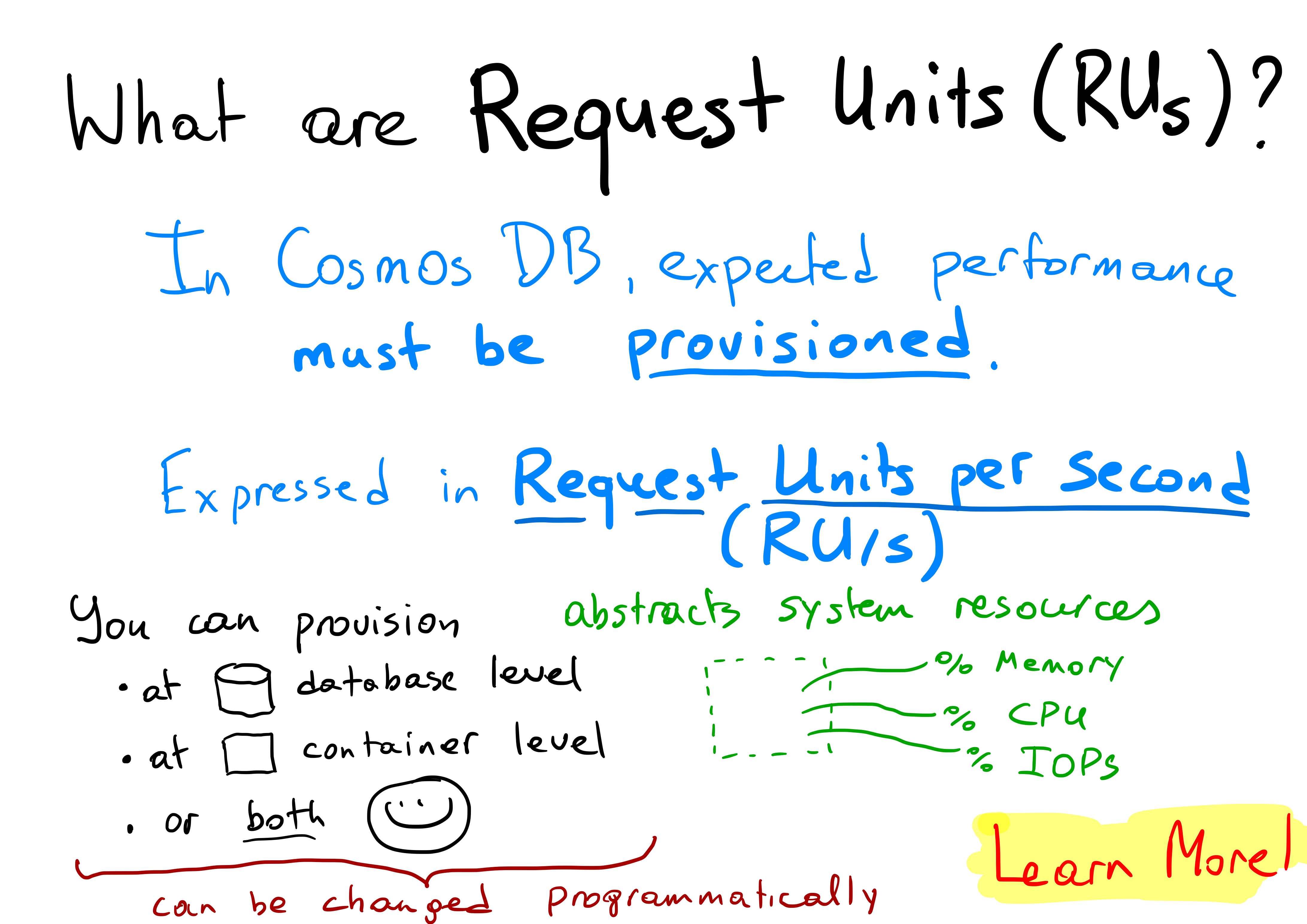
Performance is measure in a fixed unit called Request Units per Second or RUs. 1 RU is required to read 1 KB of data and 5 RU are required to write 1KB of data. So on the surface calculating how many RUs you need should be easy. Turns out it isn’t and missing your RUs can be costly or make you loose data.

Infinite Cost

This is where infinite scale turns into infinite cost. On the surface it only seems fair that infinite scale should have a price – but controlling cost in Cosmos is difficult and completely different for what you have come to expect of the Cloud.

It’s all about those RUs.

You allocate a fixed amount of RUs either to an entire database (probably can’t recommend doing that) or to individual collections – and then you pay for those fixed RUs whether you use them or not!

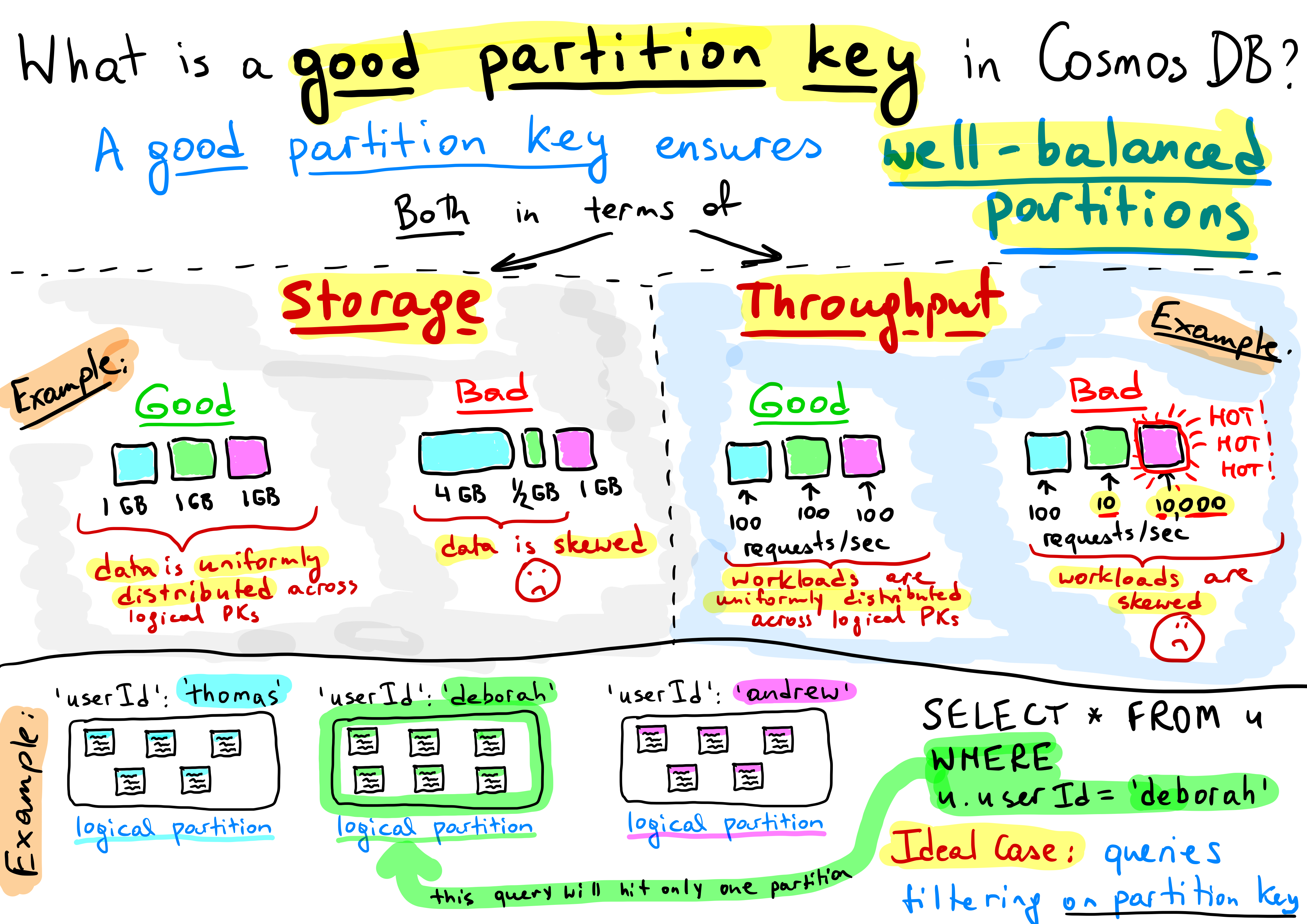
Fine you think – how much can it cost in terms of RUs to write and read some data? Quite a lot in fact and there are several factors which have great influence over how many RUs are required to write and read data. I highly recommend reading this and this but it all boils down to the partition key.

The partition key is used to distribute data over logical data partitions when Cosmos writes data. The less data you write to the same logical partition as the same time – the more performant the write is.

When reading data the partition key can be used in a query to tell Cosmos where the data is stored and make reading data more performant. If you don’t know the partition key in a query then Cosmos have to read through all the data that fits the WHERE clause and that drives RUs – because reading 1 KB costs 1 RUs – so reading through 1000s of KBs of data to find that single document can cost a lot of RUs. So if you have a lot of queries without partition key and lots of spikes then you have to provision lots of RUs and pay for them 24/7.

Unfortunately there’s no auto scaling for RUs available in Cosmos even though the competitor seems to have one. However recent additions to Azure Monitor makes it possible to create your own.

Update: At Ignite 2019 CosmosDB AutoPilot was announced which is the long awaited auto scaling feature!

If you have spikes and you run of out provisioned RUs then Cosmos will throttle the requests by sending back an HTTP429 error message. It’s then up to the client to know how to handle this and perform a retry. If the client doesn’t know how, then it’s an error and the data is probably lost. Please be aware of the retries!

Infinite Possibilities

Once you’ve tackled the scaling, cost and partition keys and you start to to use Cosmos with the change feed and hook it up to the event grid – you get a completely new publish and subscribe data layer capable of replacing integration middleware, ingesting data at IoT scale and driving real time data analysis with Spark and Databricks.

Cosmos is a game changer!

« Older posts Newer posts »

© 2026 Peter Birkholm-Buch

Theme by Anders NorenUp ↑